I’m currently going through the training for Identity and Access Administrators career path on Microsoft Learn.
While going through the exercises, I noticed a recurring mismatch between the lab instructions and the current interface in the Microsoft Entra admin center.
The instruction in Microsoft Learn
You’ll find quite a number of exercises instructing learners to sign in to the Microsoft Entra admin center and on the navigation pane, select Identity.
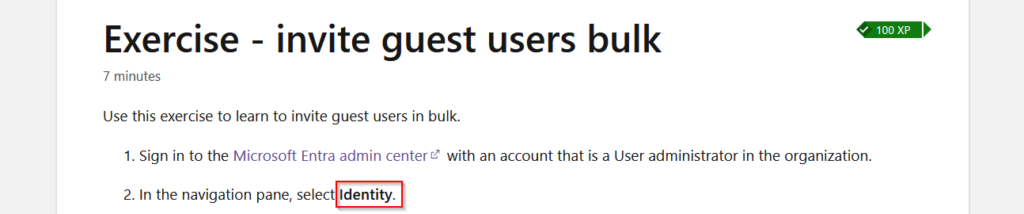

However, the current Microsoft Entra admin center interface doesn’t have the Identity option.
What the Interface Looks Like Now
In the current Microsoft Entra admin center interface, identity-related resources are grouped together under the Entra ID option.
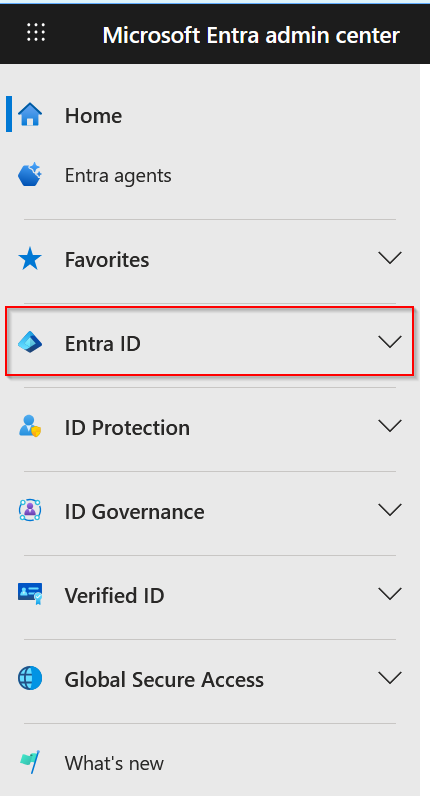
When a lab instruction references the Identity menu, you should select Entra ID in the navigation pane instead.
Quick Rule for Learners
| Lab Instruction | What to Click |
| Select Identity | Select Entra ID |
The functionality in the lab remains the same. Only the navigation label has changed.
Where This Appears
These instructions appear in several exercises in the Microsoft Identity and Access Administrator learning path, including labs involving:
- Inviting Guest Users e.g. Exercise – invite guest users bulk
- Configuring External Collaboration e.g. Exercise – configure external collaboration
- Inviting Guest Users e.g. Exercise – invite guest users bulk
- Setting up Security Defaults e.g. Exercise – Work with security defaults
Since the instructions were written before recent interface updates, the navigation terminology has not been updated in some sections.
Tips for Students Working Through SC-300 Labs
If you encounter a step that requires you to select Identity from the Microsoft Entra admin center, simply select Entra ID instead.
The rest of the instructions should work exactly as written.
Conclusion
Small interface differences like this can significantly slow down learners during labs. Hopefully, this post will help anyone working through the SC-300 learning path avoid unnecessary confusion.
If you’re currently working through the SC-300 Identity and Access Administrator learning path and encounter other interface differences or confusing lab steps, feel free to share them in the comments.
I’m documenting observations like this as I go through the labs and I’m happy to help clarify where I can.